SikaiCase
SikaiCase Custom Programmable Mechanical Mini Keyboard – 4 Keys + 1 Large Knob
SikaiCase Custom Programmable Mechanical Mini Keyboard – 4 Keys + 1 Large Knob
Couldn't load pickup availability
- Fast Free Shipping
- 30-Day Return Policy
- 12-Month Warranty
The SikaiCase 4-Key + Large Knob Programmable Mini Keyboard puts frequently used commands, media controls and multi-step shortcuts within easy reach. Four mechanical keys, a large rotary knob and version-specific shortcut layers create a compact control surface for office work, creative software, media playback and gaming.
Key Features
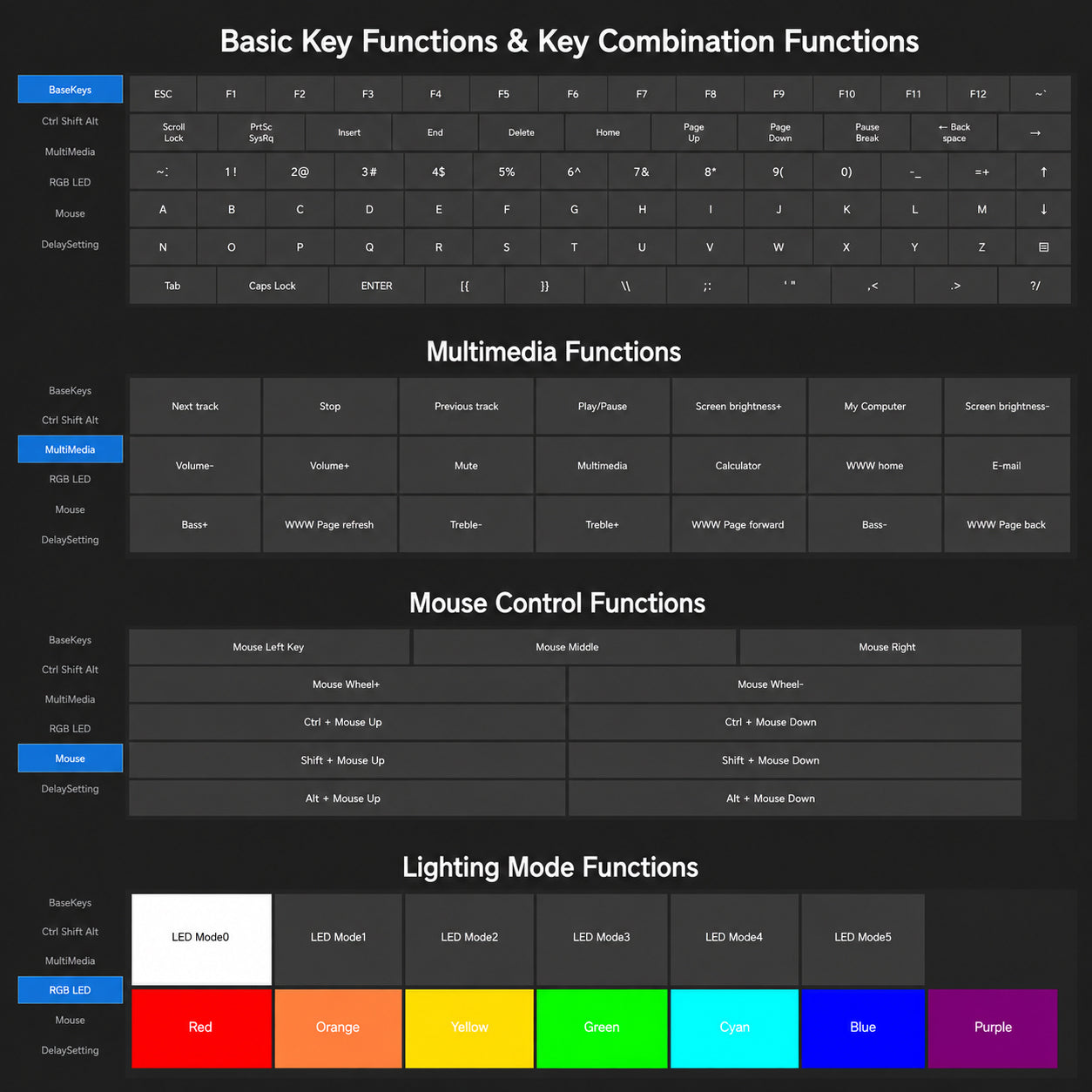
- Four programmable keys + large knob: assign keyboard shortcuts, key combinations, multimedia controls, mouse actions and other supported functions.
- Version-specific shortcut layers: the wired version supports one layer; the wireless version supports three layers that can be switched on the device.
- Customizable RGB lighting: select supported colors and lighting modes in the matching Windows or macOS software.
- Red mechanical switches: smooth linear key feel in a compact mechanical mini keyboard.
- Replaceable keycaps and hot-swappable switch design: personalize the look and key feel with compatible components.
- Onboard memory: save completed settings to the keyboard for continued use after setup.
Choose Your Connection
Wireless – Bluetooth + 2.4G / Black
Connect by Bluetooth, the included 2.4G USB receiver, or USB-C cable. This version is suited to users who want flexible desk placement or easy switching between connection methods.
Wired USB-C / Black
Connect with the included USB-C data cable for a stable, plug-in connection. This version does not include Bluetooth or a 2.4G receiver.
Software Setup
Custom key functions, layers and RGB settings must be configured through a USB-C wired connection using the matching Windows or macOS software. Download the English software and setup guide from SikaiCase Keyboard Software. After saving settings to onboard memory, the keyboard can normally retain the configuration when moved to another supported device or when the wireless version changes connection mode.
Mac shortcut note: the configuration software supports Windows and macOS. When preparing shortcuts for macOS, use the Windows key in place of Command and Left Alt in place of Option where applicable. Shortcut behavior can vary by application and operating system.
Best For
- Copy, paste, undo and other repeated office actions
- Brush, zoom, timeline and editing shortcuts
- Volume, playback and multimedia control
- Frequently used game actions and key combinations
- A compact secondary control pad beside a full-size keyboard
Before You Buy
- This listing includes two black variants: one wireless and one wired. Choose the required connection version before checkout.
- The wireless version supports Bluetooth, 2.4G and USB-C; the wired version supports USB-C only.
- The blank keycaps do not indicate preset shortcut functions. Configure the keys in the matching Windows or macOS software before use.
- Initial programming and later configuration changes require a USB-C wired connection to a Windows or macOS computer.
- Bluetooth version, battery capacity, battery life and polling rate are not specified in this listing.
What's in the Box
Wireless Version
- 4-key + knob mini keyboard
- USB-C data cable
- 2.4G USB receiver
Wired Version
- 4-key + knob mini keyboard
- USB-C data cable
Care
Disconnect the keyboard before cleaning. Wipe the exterior with a soft, dry cloth. Keep liquids away from the switches, USB-C port and internal electronic components.
FAQ
Are all four keys programmable?
Yes. The four keys can be assigned supported functions through the matching Windows or macOS software.
Can the large knob be customized?
Yes. Supported knob actions can be assigned in the software, including different actions for rotation and pressing where available.
Can I change the RGB lighting?
Yes. Supported RGB colors and lighting modes can be configured in the matching Windows or macOS software while connected by USB-C.
Does the wired version support Bluetooth?
No. The wired version uses the included USB-C data cable only.
Does the wireless version include a receiver?
Yes. The wireless version includes a 2.4G USB receiver and also supports Bluetooth and USB-C connection.
Can I program it wirelessly?
No. Connect the keyboard to a Windows or macOS computer with USB-C when setting or changing functions.
Does it work with macOS?
The matching configuration software supports Windows and macOS. Configure by USB-C and test the saved shortcuts, since mappings can differ by operating system and application.
What are the wireless version’s three layers for?
On the wireless version, they let you store separate groups of commands, such as one layer for work, one for creative software and one for gaming. The wired version supports one layer.
Are the switches and keycaps replaceable?
The product uses replaceable keycaps and a hot-swappable switch design. Use compatible parts and disconnect power before replacement.
Is this a full keyboard replacement?
No. It is a compact programmable macro pad intended to supplement your main keyboard.
Related SikaiCase Guides
Use these guides for setup and workflow planning. Match the configuration software and instructions to your exact model and selected version.
Share