SikaiCase
SikaiCase Benutzerdefinierte programmierbare mechanische Minitastatur – 4 Tasten + 1 großer Drehknopf
SikaiCase Benutzerdefinierte programmierbare mechanische Minitastatur – 4 Tasten + 1 großer Drehknopf
Verfügbarkeit für Abholungen konnte nicht geladen werden
- Schneller kostenloser Versand
- 30 Tage Rückgaberecht
- 12 Monate Garantie
Die SikaiCase 4-Tasten + großer Drehregler programmierbare Mini-Tastatur bringt häufig verwendete Befehle, Mediensteuerungen und mehrstufige Tastenkombinationen in greifbare Nähe. Vier mechanische Tasten, ein großer Drehregler und drei konfigurierbare Ebenen schaffen eine kompakte Bedienoberfläche für Büroarbeiten, kreative Software, Medienwiedergabe und Gaming.
Hauptmerkmale
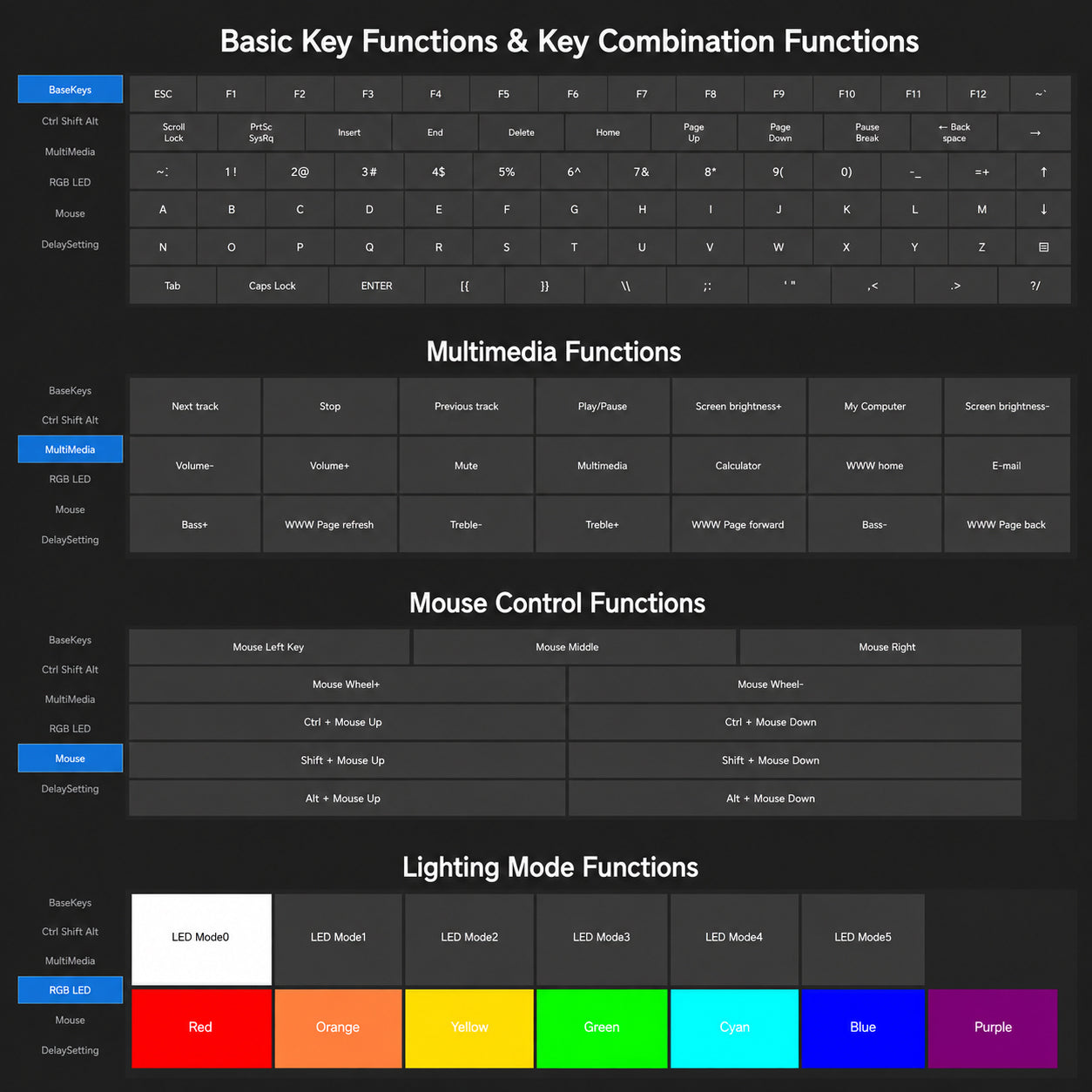
- Vier programmierbare Tasten + großer Drehregler: Weisen Sie Tastaturkürzel, Tastenkombinationen, Multimedia-Steuerungen, Mausaktionen und andere unterstützte Funktionen zu.
- Drei konfigurierbare Ebenen: Organisieren Sie separate Layouts für Arbeit, kreative Aufgaben und Gaming und wechseln Sie direkt am Gerät zwischen ihnen.
- Anpassbare RGB-Beleuchtung: Wählen Sie unterstützte Farben und Beleuchtungsmodi in der Windows-Software.
- Rote mechanische Schalter: Sanftes lineares Tasten-Gefühl in einer kompakten mechanischen Mini-Tastatur.
- Austauschbare Tastenkappen und Hot-Swap-Design: Personalisieren Sie das Aussehen und das Tippgefühl mit kompatiblen Komponenten.
- Interner Speicher: Speichern Sie die konfigurierten Einstellungen auf der Tastatur für die weitere Verwendung nach der Einrichtung.
Wählen Sie Ihren Anschluss
Drahtlos – Bluetooth + 2.4G / Schwarz
Verbindung über Bluetooth, den mitgelieferten 2.4G USB-Empfänger oder das USB-C-Kabel. Diese Version eignet sich für Benutzer, die eine flexible Platzierung auf dem Schreibtisch oder einen einfachen Wechsel zwischen Verbindungsmethoden wünschen.
Kabelgebunden USB-C / Schwarz
Verbindung über das mitgelieferte USB-C-Datenkabel für eine stabile Kabelverbindung. Diese Version enthält kein Bluetooth und keinen 2.4G-Empfänger.
Software-Einrichtung
Benutzerdefinierte Tastenfunktionen, Ebenen und RGB-Einstellungen müssen über eine kabelgebundene USB-C-Verbindung mit der aktuellen Windows-Software konfiguriert werden. Laden Sie die englische Software und das Einrichtungshandbuch unter SikaiCase Keyboard Software herunter. Nach dem Speichern der Einstellungen im internen Speicher behält die Tastatur die Konfiguration normalerweise bei, wenn sie an ein anderes unterstütztes Gerät angeschlossen wird oder die kabellose Version den Verbindungsmodus wechselt.
Hinweis zu Mac-Tastenkombinationen: Die aktuelle Konfigurationssoftware ist für Windows bestimmt. Verwenden Sie beim Vorbereiten von Tastenkombinationen für macOS gegebenenfalls die Windows-Taste anstelle von Command und die linke Alt-Taste anstelle von Option. Das Verhalten der Tastenkombinationen kann je nach Anwendung und Betriebssystem variieren.
Am besten geeignet für
- Kopieren, Einfügen, Rückgängigmachen und andere wiederkehrende Büroaktionen
- Pinsel-, Zoom-, Zeitachsen- und Bearbeitungskürzel
- Lautstärke-, Wiedergabe- und Multimedia-Steuerung
- Häufig verwendete Spielaktionen und Tastenkombinationen
- Ein kompaktes sekundäres Bedienfeld neben einer Tastatur in Standardgröße
Vor dem Kauf
- Dieses Angebot umfasst zwei schwarze Varianten: eine kabellose und eine kabelgebundene. Wählen Sie vor dem Bezahlen die gewünschte Anschlussversion.
- Die kabellose Version unterstützt Bluetooth, 2.4G und USB-C; die kabelgebundene Version unterstützt nur USB-C.
- Die leeren Tastenkappen geben keine voreingestellten Funktionen an. Konfigurieren Sie die Tasten vor der Verwendung in der Windows-Software.
- Die anfängliche Programmierung und spätere Konfigurationsänderungen erfordern eine kabelgebundene USB-C-Verbindung zu einem Windows-Computer.
- Bluetooth-Version, Akkukapazität, Akkulaufzeit und Abfragerate (Polling Rate) sind in diesem Angebot nicht spezifiziert.
Lieferumfang
Kabellose Version
- 4-Tasten + Drehregler Mini-Tastatur
- USB-C-Datenkabel
- 2.4G USB-Empfänger
Kabelgebundene Version
- 4-Tasten + Drehregler Mini-Tastatur
- USB-C-Datenkabel
Pflege
Trennen Sie die Tastatur vor der Reinigung vom Computer. Wischen Sie die Außenseite mit einem weichen, trockenen Tuch ab. Halten Sie Flüssigkeiten von den Schaltern, dem USB-C-Anschluss und den internen elektronischen Bauteilen fern.
FAQ
Sind alle vier Tasten programmierbar?
Ja. Den vier Tasten können über die Windows-Software unterstützte Funktionen zugewiesen werden.
Kann der große Drehregler angepasst werden?
Ja. Unterstützte Aktionen für den Drehregler können in der Software zugewiesen werden, einschließlich verschiedener Aktionen für Drehen und Drücken, sofern verfügbar.
Kann ich die RGB-Beleuchtung ändern?
Ja. Unterstützte RGB-Farben und Beleuchtungsmodi können in der Windows-Software konfiguriert werden, während die Tastatur über USB-C verbunden ist.
Unterstützt die kabelgebundene Version Bluetooth?
Nein. Die kabelgebundene Version verwendet ausschließlich das mitgelieferte USB-C-Datenkabel.
Enthält die kabellose Version einen Empfänger?
Ja. Die kabellose Version enthält einen 2.4G USB-Empfänger und unterstützt zudem Bluetooth- und USB-C-Verbindungen.
Kann ich sie kabellos programmieren?
Nein. Verbinden Sie die Tastatur zum Einstellen oder Ändern von Funktionen per USB-C mit einem Windows-Computer.
Funktioniert sie mit macOS?
Gespeicherte Standard-Tastenkombinationen funktionieren möglicherweise unter macOS, die aktuelle Einrichtungssoftware ist jedoch nur für Windows geeignet und Tastenbelegungen können je nach Anwendung abweichen.
Wofür sind die drei Ebenen?
Sie ermöglichen das Speichern separater Befehlsgruppen, zum Beispiel eine Ebene für die Arbeit, eine für kreative Software und eine für Gaming.
Sind die Schalter und Tastenkappen austauschbar?
Das Produkt verwendet austauschbare Tastenkappen und ein Hot-Swap-Schalterdesign. Verwenden Sie kompatible Teile und trennen Sie die Stromversorgung vor dem Austausch.
Ist dies ein Ersatz für eine vollständige Tastatur?
Nein. Es handelt sich um ein kompaktes programmierbares Makro-Pad, das Ihre Haupttastatur ergänzen soll.
Teilen