SikaiCase
SikaiCase Foldable Bluetooth Keyboard with Touchpad & Stand
SikaiCase Foldable Bluetooth Keyboard with Touchpad & Stand
No se pudo cargar la disponibilidad de retiro
- Envío rápido y gratuito
- Política de devoluciones de 30 días
- Garantía de 12 meses
A compact workspace for the phone or tablet you already carry.
The SikaiCase Foldable Bluetooth Keyboard with Touchpad combines physical keys, a large front trackpad and a folding device stand in one portable setup. Open it on a desk, connect your phone or tablet and move from short screen taps to messages, notes and everyday documents. Black keys with orange accents keep the compact layout easy to recognize.
Less to Pack, More Room to Work
Typing a long email on a phone can feel cramped. Carrying a separate keyboard, mouse and stand adds more pieces to your bag. This folding keyboard brings typing, pointer control and screen support together, then closes into a compact package when you are ready to leave.
Key Benefits
- Large front touchpad: navigate supported apps and move the pointer without packing a separate mouse. Touchpad functions depend on the connected operating system.
- Two Bluetooth channels: pair two devices and switch between them using Fn + 1 or Fn + 2. Input goes to one selected device at a time.
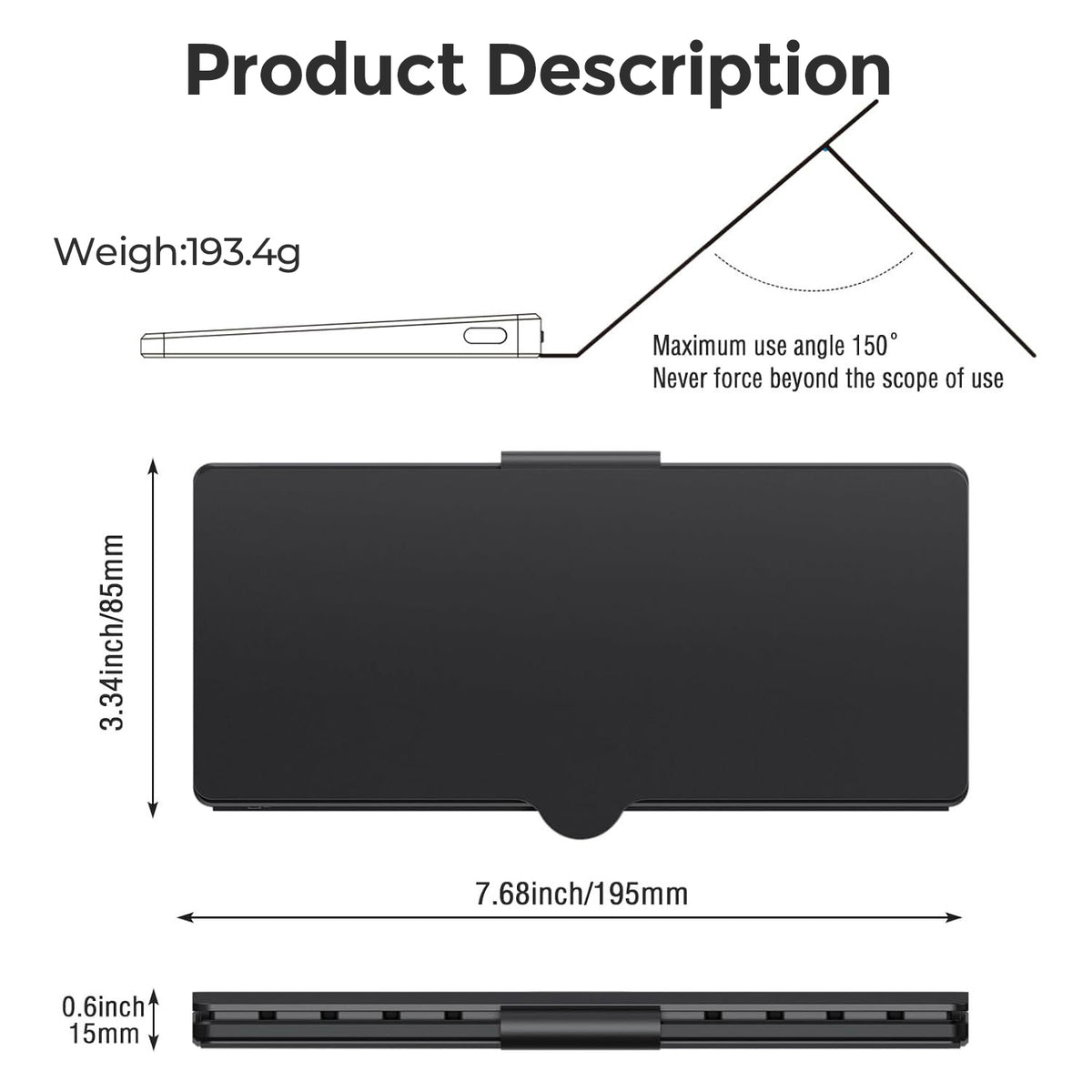
- Integrated folding stand: adjust the cover/stand to position a compatible phone or tablet for viewing. Do not open the support beyond its stated 150° limit.
- Compact folding design: close the trackpad panel and cover for storage in a work bag or travel pouch.
- Low-profile scissor keys: a quiet typing design suited to shared workspaces, notes and everyday communication.
- USB-C rechargeable: recharge the built-in 150mAh lithium battery instead of carrying disposable replacements.

Who Is It For?
| User | Typical task | Useful benefit |
|---|---|---|
| Travelers and commuters | Replying to emails or updating documents between destinations | Keyboard, touchpad and stand pack together. |
| Phone and small-tablet users | Writing longer messages, taking notes and browsing | Physical keys and supported pointer control reduce repeated touchscreen reaching. |
| People working across two devices | Switching from tablet notes to a phone conversation | Two saved Bluetooth channels avoid repeatedly opening pairing settings. |
| Students and meeting participants | Capturing notes on a portable device | Low-profile keys and an integrated viewing stand suit compact desk spaces. |
Best fit: light mobile work where portability matters. The compact key spacing takes adjustment and is less suited to long desktop typing sessions, extensive spreadsheet number entry or gaming that needs a full-size keyboard.

Compatibility & Before You Buy
- Works with: Bluetooth-enabled Android, iOS/iPadOS and Windows devices that support external Bluetooth keyboards.
- Keyboard versus touchpad: basic typing support does not guarantee every gesture, shortcut or mouse function. Pointer support varies by device, operating-system version and app.
- Check the stand fit: your device must sit securely on the support. Case thickness, weight, orientation and screen size affect stability; use a separate stand if needed.
- Check the layout: this is a compact English QWERTY layout with shared Fn functions, not a full-size desktop keyboard or a dedicated numeric keypad.
- Not for: devices without compatible Bluetooth keyboard support, simultaneous typing to two devices, or a device that cannot rest securely on the stand.
Design & Touchpad Control
The trackpad folds in front of the keys when open, giving the setup a small laptop-style arrangement. The rear cover folds into a support, while the orange accent keys help identify frequently used controls. The cover protects the keyboard during storage; it is not a fitted protective case for your phone or tablet.
Touchpad gestures and function-key behavior can differ across platforms. Review the supplied shortcut instructions and test the controls on your device before relying on them for a trip or meeting.

Product Specifications
| Product | Foldable Bluetooth keyboard with front touchpad and integrated stand |
|---|---|
| Color | Black with orange accent keys |
| Layout | Compact English QWERTY; shared Fn functions |
| Key mechanism | Low-profile scissor keys |
| Connection | Bluetooth, two saved channels; one active device at a time |
| Channel switching | Fn + 1 / Fn + 2 |
| Charging | USB-C; built-in 150mAh rechargeable lithium battery |
| Charging time | Approx. 2–3 hours according to supplied product information; varies by power source and battery state |
| Folded dimensions | Approx. 195 × 85 × 15 mm, as shown in the supplied dimensional drawing |
| Stated weight | Approx. 193.4 g, according to supplied product information |
| Stand opening limit | Up to 150°; do not force beyond the limit |
| Materials | ABS and PU cover material; PU is synthetic leather |
How to Pair & Switch Devices
- Charge the keyboard, unfold it on a firm, level surface and turn it on.
- Hold Fn + 1 for approximately 3 seconds until the pairing indicator flashes.
- Enable Bluetooth on your device and select Wireless Keyboard from the available-device list. The displayed name can vary by batch.
- For a second device, select the second channel and follow the supplied Fn + 2 pairing instructions.
- After pairing, press Fn + 1 or Fn + 2 to choose which device receives input.
If reconnection fails, check the selected channel, battery and Bluetooth settings. If necessary, remove the saved keyboard entry from that device and repeat pairing. Nearby previously paired devices can affect which connection becomes active.
Using the Stand & Packing Away
- Fold the cover into its support position and select a stable viewing angle.
- Place your phone or tablet on the support and check that it is balanced before typing.
- Keep the support within the stated 150° opening limit. A larger angle does not mean every device will remain stable.
- Remove your device before folding the keyboard. Close the panels gently and ensure no cable or object is trapped inside.

Charging & Care
Use a suitable USB power source and the USB-C charging cable. The port is described here as a charging connection; wired USB keyboard operation is not promised. Charge before travel, keep the keyboard dry and wipe it with a soft, dry cloth. Avoid pressure on the touchpad, forcing the folds, placing heavy objects on the closed unit or exposing it to excessive heat.
What's Included
- 1 × black/orange foldable Bluetooth keyboard with integrated touchpad and folding stand/cover
- 1 × USB-C charging cable
Phones, tablets, computers, external mice and other lifestyle props shown in the images are not included.
Important Notes
- Two saved connections do not mean two devices receive the same keystrokes simultaneously.
- Key spacing and Fn combinations differ from a full-size keyboard. Check the actual key legends in the photos.
- Operating-system shortcuts, pointer support and gestures vary; not every desktop function is available in mobile apps.
- The stand is for stationary use on a stable surface. Do not carry a phone or tablet by the keyboard or stand.
- Battery runtime depends on touchpad use, typing, connection and storage conditions.
Frequently Asked Questions
1. Can it pair with two devices?
Yes. It has two Bluetooth channels. Pair the devices to separate channels and switch using Fn + 1 or Fn + 2.
2. Can I type on both devices at once?
No. Only the selected device receives keyboard and touchpad input.
3. Is the touchpad built in?
Yes. The large front panel is the integrated touchpad and folds with the keyboard for storage.
4. Will all gestures work on my iPhone or iPad?
Not necessarily. Keyboard input, pointer support and gestures depend on the operating system and app. Check your device's external keyboard and pointer settings before buying.
5. Does it work with Android and Windows?
It supports compatible Bluetooth keyboard connections on Android and Windows. Shortcuts and touchpad behavior can differ between devices and apps.
6. Is a separate stand required?
The folding cover forms a stand for suitable devices. If your device or case is too large, heavy or unstable, use a separate support.
7. How far can I open the stand?
The supplied product information specifies a maximum of 150°. Never force it beyond the designed range.
8. Is this a full-size keyboard?
No. It uses a compact English QWERTY layout with shared functions and no dedicated numeric keypad. Allow time to adjust to its spacing.
9. How is it charged?
The built-in 150mAh rechargeable lithium battery charges through the USB-C port. Supplied information indicates approximately 2–3 hours for a full charge, depending on charging conditions.
10. Does the USB-C cable provide a wired typing connection?
This listing specifies Bluetooth typing and USB-C charging. Wired USB typing is not confirmed.
11. Can I fold it while my phone is on the stand?
Remove the phone or tablet first, then close the panels gently to avoid damaging the device or keyboard.
12. Is the cover genuine leather?
No. The supplied material description identifies PU, a synthetic leather material, alongside ABS construction.
13. What should I do if it will not reconnect?
Check battery power, Bluetooth and the selected Fn channel. If necessary, forget the keyboard on the intended device and pair it again.
14. Where can I get setup help?
Email sikaicase@sikaiglobal.com with your order number, device model and operating-system version.
A Small Setup for Everyday Progress
Finish the message, capture the idea or update a document wherever you find a stable place to work. This compact setup lets your familiar mobile device do more without filling your bag with separate accessories.
Apple, iPhone, iPad, Android and Windows are trademarks of their respective owners. SikaiCase is an independent accessory brand and is not affiliated with or endorsed by those companies. Device names are used only to explain compatibility.