SikaiCase
SikaiCase Bear Silicone Case for Apple TV Siri Remote 2nd/3rd/4th Gen with AirTag Holder
SikaiCase Bear Silicone Case for Apple TV Siri Remote 2nd/3rd/4th Gen with AirTag Holder
Couldn't load pickup availability
- Fast Free Shipping
- 30-Day Return Policy
- 12-Month Warranty
The SikaiCase Bear Silicone Case for Apple TV Siri Remote combines a playful bear shape with an integrated hidden AirTag holder. Designed for the silver Apple TV Siri Remote 2nd, 3rd and 4th generation, the soft silicone body adds grip and everyday cushioning while keeping the clickpad, buttons, infrared area and charging port accessible.
Key features
- Cute bear design: raised ears, paws and facial details make the slim remote easier to recognize around the sofa or living room.
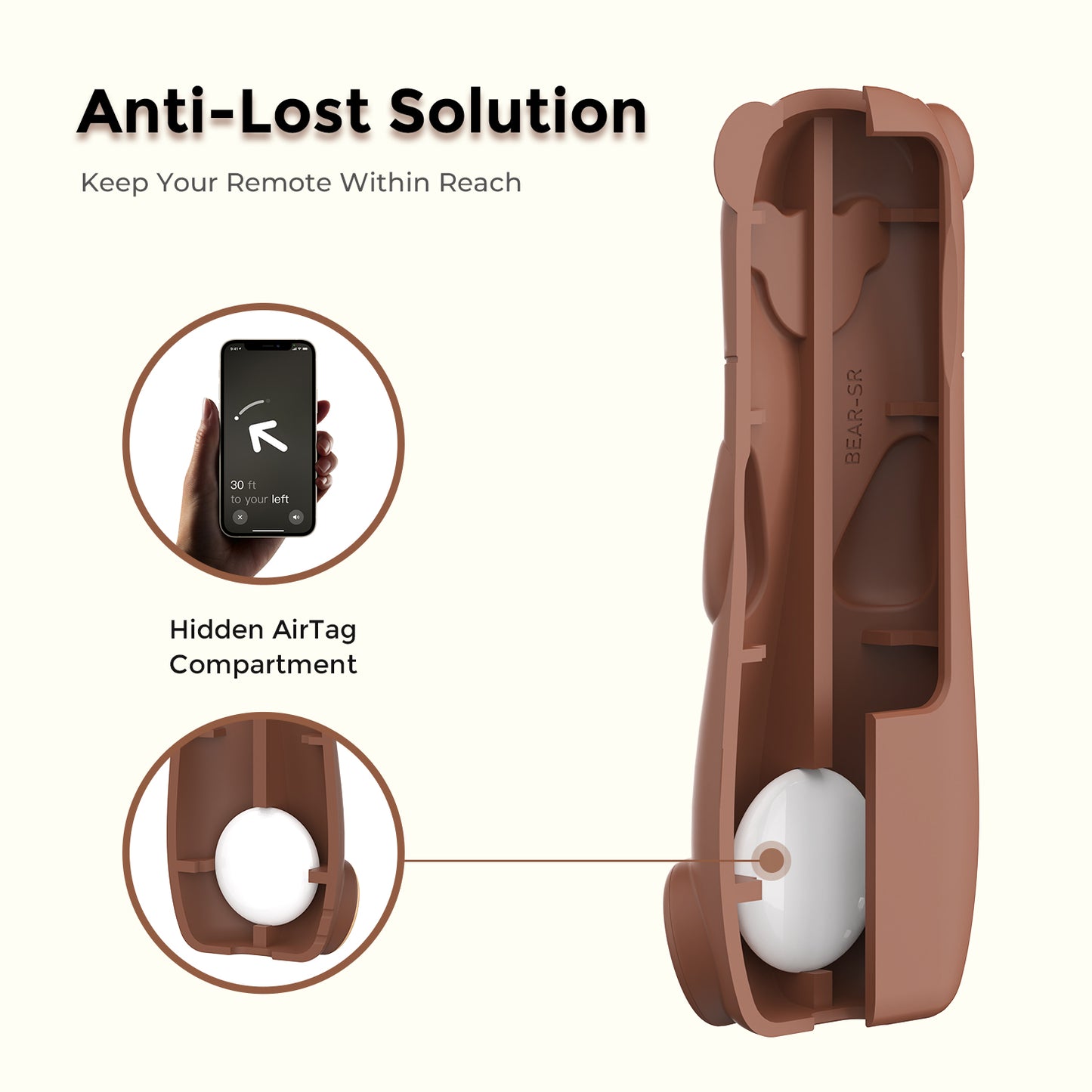
- Hidden AirTag holder: an internal compartment helps you locate the remote with a separately sold Apple AirTag.
- Comfortable silicone grip: the flexible, anti-slip surface fits naturally in the hand and helps reduce accidental slips.
- Everyday protection: raised edges and the thicker character shape help cushion the remote against scratches, bumps and short drops.
- Precision access: the circular clickpad, front buttons, top infrared opening and lower charging port remain accessible.
- Two colors: choose Brown or Pink to match your setup.
Compatibility
Works with: Apple TV Siri Remote 2nd generation (2021, Lightning), 3rd generation (2022, USB-C), and 4th generation (2026, USB-C) included with Apple TV 4K (4th generation). The silver 2nd/3rd/4th-generation remotes share the 136 × 35 × 9.25 mm external dimensions and circular clickpad. SikaiCase confirms this case is designed to fit these remote generations. Check the visible controls and charging opening against the gallery before ordering.
Not compatible with: the black 1st-generation Siri Remote / Apple TV Remote, older aluminum Apple remotes, or remotes with a different shape and button layout.
Before ordering: compare your remote's front button layout and overall shape with the compatibility image. The Apple TV box model alone may not identify which remote you own.
AirTag and charging access
Place a compatible Apple AirTag into the hidden rear compartment before installing the remote. The AirTag is not included. The lower port opening lets you connect the appropriate Lightning or USB-C cable without removing the case.
How to install
- Confirm that your remote matches the silver 2nd-, 3rd- or 4th-generation layout.
- If desired, insert your AirTag securely into the internal holder.
- Slide the top of the Siri Remote into the case first.
- Gently stretch the lower edge over the charging end.
- Check that the clickpad, buttons, infrared opening and charging port align correctly.
Care
Remove the remote and AirTag before cleaning. Wash the silicone cover with mild soap and water or wipe it with a damp cloth, then allow it to dry completely before reinstalling. Avoid harsh solvents and high heat.
Package contents
- 1 × SikaiCase Bear Silicone Case with integrated AirTag holder
Apple TV Siri Remote, Apple AirTag, charging cable and other accessories are not included.
Frequently asked questions
Which Apple TV remote does this case fit?
It fits the silver Siri Remote 2nd generation (2021, Lightning), 3rd generation (2022, USB-C), and 4th generation (2026, USB-C), as listed in the Compatibility section. Compare your remote's shape, controls and charging opening with the product images before ordering.
Does it fit the older black Siri Remote?
No. The black 1st-generation Siri Remote has a different body and control layout.
Is an Apple AirTag included?
No. The case includes a hidden AirTag holder only; the AirTag is sold separately.
Can I charge the remote with the case installed?
Yes. The lower charging opening remains accessible. Use the connector required by your remote: Lightning for the 2nd generation or USB-C for the 3rd and 4th generations.
Does the case block the buttons or infrared signal?
The front controls and top infrared area are intentionally left open. Check alignment after installation.
Is the cover waterproof?
No. It is intended for grip, scratch reduction and light impact cushioning, not water protection or guaranteed damage prevention.
How do I choose between Brown and Pink?
Select the color in the variant menu. Each variant has its own product image and SKU.
Can the silicone case be washed?
Yes. Remove the remote and AirTag first, clean with mild soap and water, and dry the cover fully before reuse.
Helpful links
Shop remote covers for Apple · Read the Apple TV Siri Remote case guide · SikaiCase FAQ
Does the 4th-generation Siri Remote need an AirTag?
The 4th-generation Siri Remote includes its own Find My support with Precision Finding and sound playback. An AirTag is not necessary for those built-in functions. This case's AirTag compartment is an optional accessory holder only; AirTag is not included.
Compatibility notice: Apple, Apple TV, Siri Remote and AirTag are trademarks of Apple Inc. SikaiCase is an independent third-party accessory brand and is not affiliated with, authorized by or endorsed by Apple. Brand and model names are used only to identify compatibility.
Share